
Step 1
Suspicious data from external sources is identified.


Police CyberAlarm is a free tool to help you understand and monitor malicious cyber activity against your network. This service is made up of two parts: monitoring and vulnerability scanning.

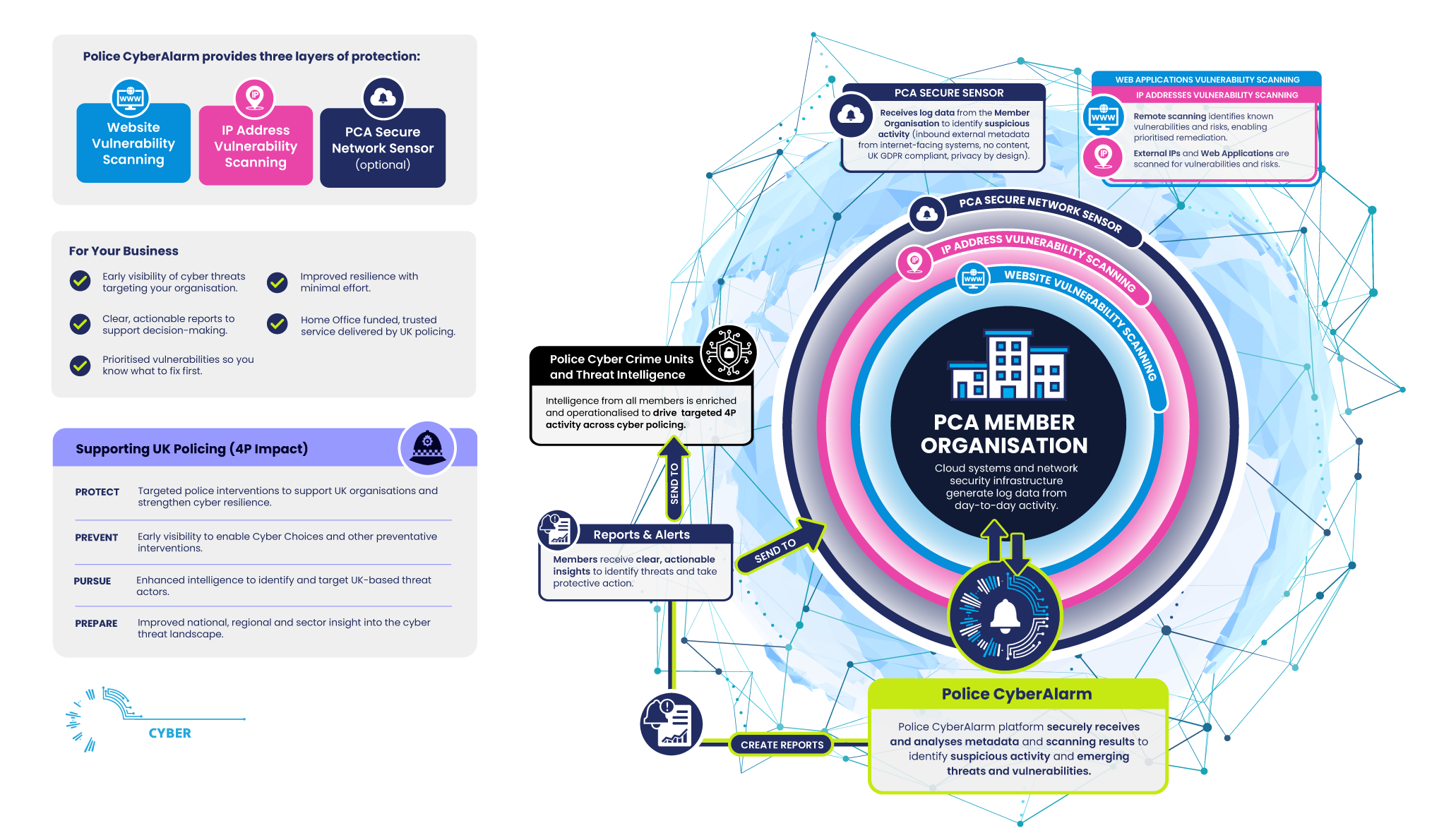
Reports highlight threats, update blacklists, strengthen security and assist organisations.
Scans websites, detects vulnerabilities, reports and alerts you to threats, strengthens security.
Members receive threat and vulnerability reports, improving protection against risks.
Suspicious data from external sources is identified.
Internal traffic and data is filtered out.
The suspicious data is encrypted and transmitted to the PCA servers
The data is analysed to identify if there is a threat.
If it is identified as malicious the member is alerted of any of the steps they need to take to mitigate the risk.
This is shared with Police forces allowing them to identify new trends, patterns and cyber-attacks.
Police CyberAlarm monitors inbound traffic on the organisation’s network and collects data to produce reports on the latest cyber threats. These reports allow member organisations to update blacklists and other security measures with new IP addresses and relevant information, helping to strengthen their overall security.
A firewall is a key security device that acts as the first line of defence against online threats. It filters network traffic based on predefined rules, blocking unwanted or suspicious connections while allowing safe data through. By analysing firewall logs, Police CyberAlarm can identify attempted attacks, their sources, and how they target your network.
A Network Intrusion Detection System monitors network traffic that has passed through your firewall, analysing data packets for suspicious or malicious activity. By using advanced rules and threat intelligence, IDS helps identify potential attacks that may bypass basic security measures.
An Intrusion Prevention System not only detects suspicious network activity but can also take immediate action to block it. Using advanced threat intelligence, deep packet inspection and up-to-date threat intelligence, IPS helps stop harmful traffic before it reaches your systems.
Anti-virus software scans files and data to detect and block malware before it can harm your systems. While desktop AV protects users' devices, network-level AV adds an extra layer by safeguarding other equipment like routers and switches. The logs help identify the source of threats and support ongoing cyber protection.
Anti-spam systems filter out fraudulent or malicious emails that other defences may miss. By scanning messages for dangerous links, attachments, or known scams, they stop threats before they reach users' inboxes. Logs shared with Police CyberAlarm help identify and analyse attempted email-based attacks targeting your organisation.
Network AV adds an extra layer of protection by scanning data as it moves across your network, helping to stop viruses and malware before they reach users or devices. Watch the video below for further information.
Police CyberAlarm Vulnerability Scanning helps organisations identify weaknesses in their websites and external IP addresses before criminals can exploit them. Regular scans generate straightforward reports that highlight known risks, helping to strengthen cybersecurity and protect against suspicious activity. Monthly scanning makes it easier to stay ahead of new threats that could affect your network, website, or online services.
Scans your organisation's website addresses (URLs) and external IP addresses.
Identifies what services are available (e.g. web requests from a server).
Detects the software and version being used.
Compares results against international databases of known vulnerabilities.
Tests, where possible, to see if your organisation may be exposed.
Each weakness that is found is given a Common Vulnerability Exposure (CVE) code. This code explains which systems are affected, how serious the risk is, and what steps can be taken to fix it.
Police CyberAlarm carries out these scans regularly and provides updated reports. Where possible, the reports include CVE details to help organisations understand the issue and take action to reduce or remove the risk.
Watch the video below to see how regular scanning identifies potential security gaps and helps keep your organisation safe.
Police CyberAlarm provides regular reports that highlight suspicious traffic and potential attacks aimed at your organisation. These reports give you a clear picture of how your systems are being targeted and help you take action to strengthen your defences.
A summary of suspicious traffic coming from the internet into your network.
The top sources of suspicious activity.
The ports (entry points) attackers are trying to use against your systems.
A breakdown of suspicious activity from within the UK and from outside the UK.

Police CyberAlarm reports show your organisation how it is being attacked and where those attacks are coming from. This information makes it easier to update security measures and stay one step ahead of threats.
If you also choose to use Vulnerability Scanning, you will receive an additional Vulnerability Assessment Report. This report highlights potential weaknesses in your systems and includes CVE (Common Vulnerability Exposure) codes. These codes provide details on the risks identified and recommended steps for fixing them.
To become a Member of Police CyberAlarm you will require the following:
Your organisation must have its own firewall to monitor and log network traffic.
Only organisations that own and manage the data they share can use Police CyberAlarm.
Have a virtual or physical machine with 2GB RAM 2CPU Cores and 25GB HDD.
Join Police CyberAlarm today and start receiving regular security updates and reports to help you and others gain a better understanding of current threats.

A Home Office–funded police service with no cost.

Regular insights on suspicious traffic targeting your business.

Checks your website and external IPs for weaknesses.

Stay informed on the latest cyber threats and trends.
Data can assist evidence gathering if incidents occur.

Helps you prioritise security investments and defences.

Fully funded by the Home Office for IT businesses.

Helps monitor suspicious activity across client networks.
Identify weaknesses in servers, networks, and endpoints.

Stay ahead of emerging cyber threats for clients.

Data can assist investigations if clients are targeted.

Inform security recommendations and prioritise protective measures.
Home Office–funded police service at no cost to schools, colleges or universities.

Receive updates on phishing, malware, and online risks targeting education.
Scans IT systems, networks, and external connections for weaknesses to keep you secure.

Stay informed on trends affecting students, staff, and systems within the education sector.

Provides evidence if cyber incidents affect your school, college or university.

Helps educational institutes prioritise protective measures and IT investment.